

A study plan every day
It decides which subjects to do tonight and for how long, and keeps the whole term on track.
Help at home every evening, so your child keeps up at school - and wants to.
Parents create and hold accounts for younger children.
biqib AI School is a study app for Sri Lankan students from Grade 1 to A/L. Every evening it gives a child a plan for the day, teaches each subject from the textbook they carry to school, answers their questions, and marks the work they write - in Sinhala, Tamil or English. It does not replace school or a teacher; it is the patient help at home between one school day and the next.
It decides which subjects to do tonight and for how long, and keeps the whole term on track.

Lessons follow the national syllabus and the chapters of the book in their bag, with the page to open.

Questions are answered any time, read aloud if they like, and homework is helped - never done for them.

You choose the package and subjects, and see what was studied and how each subject is going.
You see what your child studied, what was marked and how each subject is going. For a younger child you hold the account; from Grade 6 you can hand it over and still keep an eye on it until Grade 8.
More for parents
These are the app's own screens, playing. Tap one to see it on the phone.
A plan for today Each subject gets its time, and ticking one off moves the day along.
A lesson that teaches first Short steps from the textbook, read aloud in the child's language.
Help with homework, never doing it The tutor explains with its own example; the child does theirs, and it is checked.
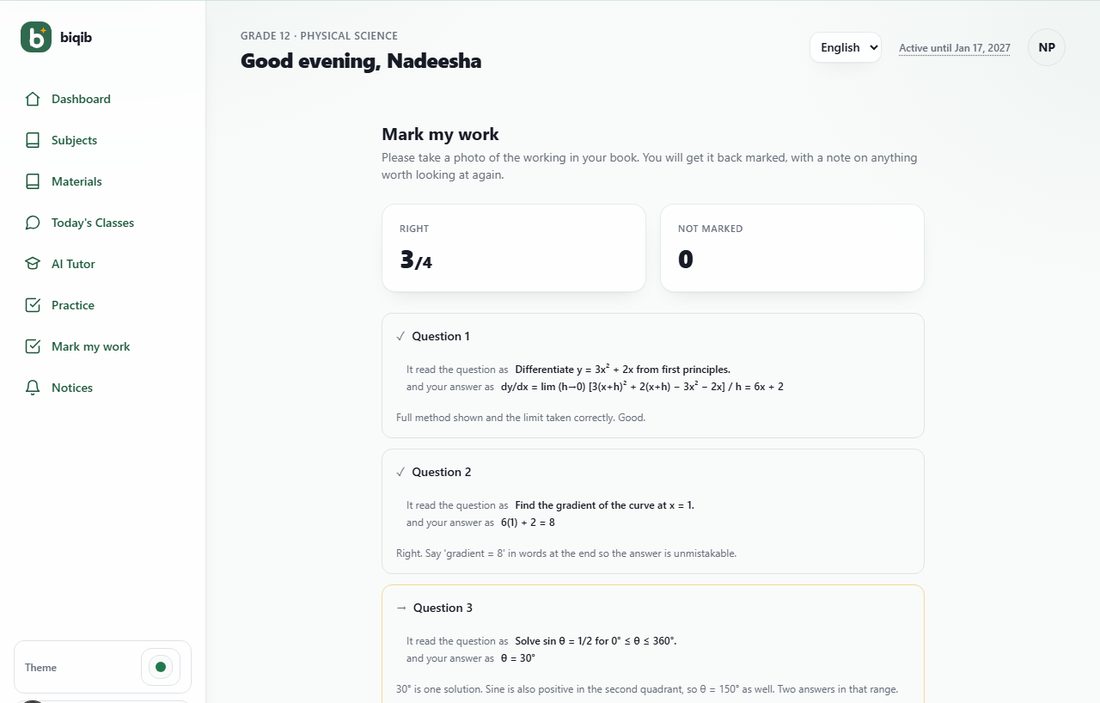
Written work, marked A photo of the answer sheet comes back with marks and a comment.
Progress they can see Chapter by chapter through their own textbook, with a streak and stars to keep going.
Five steps from signing up to the first marked answer. It plays on its own; tap a step to look closer.
The tutor never just gives the answer. It shows each step, says what changed, and lets the student try the next one.
A child types or says the question their school set. The tutor explains the idea from their own textbook with an example of its own, and shows the page to look at - it never works through the problem they were set.
Then they do it themselves, photograph the working, and it is checked: which answers are right, and why the others are not. Homework stays theirs, and so does the learning.
Photograph the answer sheet from a phone. Each answer gets a mark and a short comment, and the student can ask the tutor about anything marked wrong.
The marking shows what it read on the page - the question and the answer - so a wrong mark can be checked in one glance.
Everything is built from the textbooks and past papers for the student's own grade, subject and medium.
Each topic becomes a short lesson with questions along the way, read aloud in the student's language if they like.
Type or speak a question and get an explanation from the syllabus, not from the whole internet.
Photograph an answer paper and get it marked with comments, the way a teacher would.
A plan for each day, recaps after each lesson, topic tests, and model papers in the style of the Term, Scholarship, O/L and A/L exams.
Grade 1 to Grade 13, in Sinhala, Tamil and English medium, and the Tamil-English and Sinhala-English bilingual mediums from Grade 6. Every subject in the grade is there; if any subject is missing, write to us and we will add it.
By bank deposit or transfer. When you choose a paid package in the app, the school's account details, the package code (SKU) and your Student ID are sent to you at once by email and WhatsApp. Pay at the bank counter, a cash deposit machine or by online transfer, write the Student ID and the SKU on the slip, then upload a photo of the slip on the Subscription page within seven days. The school matches it on its bank statement, usually within one working day, and the package starts; a receipt comes by email and appears in the app.
No, and that is deliberate. Ask it to solve a question and it will not; it works through an example of its own from the textbook and asks your child to try the next step. When the child photographs their own work, it checks it. Understanding is explained fully; the set work stays theirs.
It is built for children first: the tutor answers only from the textbook, it refuses attempts to change how it behaves, it never gives the homework answer, its language is checked to stay kind, younger children's accounts are held by a parent, and a parent can see everything. Our Child safety page sets out each protection in plain words. No filter is perfect, so we ask parents to stay close, and we act on every report.
No. One account is for one student. Everything in it - the timetable, the lessons, the tutor's memory, the marks and the stars - is built around that one child, and the Terms say so (Fair use of the AI: one student per account, a person not a script). If we find an account being used by more than one student, the account is blocked. A parent with several children does not need to share: one parent sign-in holds a separate profile for each child, each with its own subjects and progress, and each child needs their own package.
No. It teaches from the textbook to keep it honest; it shows the page it drew on, and it says when it cannot answer. Treat it as a patient teacher, not an oracle: if something looks wrong, check the book, and tell us through the app so we can fix the lesson for everyone.
Your child's lessons, questions, photographs and marks are stored so the app can teach from them and show progress, and are seen only by the account holder and the school's staff who support you. They are never sold or used for advertising. To mark work and answer questions, text and photographs are sent to the AI provider named in our Privacy Policy, under terms that forbid training on them; a parent or guardian and the child agree to this inside the app before any work goes to the AI.
Leave an email address or a WhatsApp number and we will tell you when something new is ready, and when there is an offer for families.
One of the two is enough. This is for parents, not for children, and you can ask us to stop at any time.
Create an account in a few minutes. A parent can set one up for a child.
Create an account